Zams Enrich
Last updated: September 2, 2025
Zams Enrich is a built-in feature designed for sales and business development teams who need quick insights about people or companies. With Zams Enrich, you can automatically gather useful details from public data sources to better prepare for conversations, outreach, and research. You can request data either by natural language, LinkedIn profile or company URL.
Intro Video
Prerequisites
No setup or external accounts are required.
ZamsEnrich is included as part of your Zams account.
Setup
Go to Settings in your Zams dashboard.
Scroll down to the Enrich section.
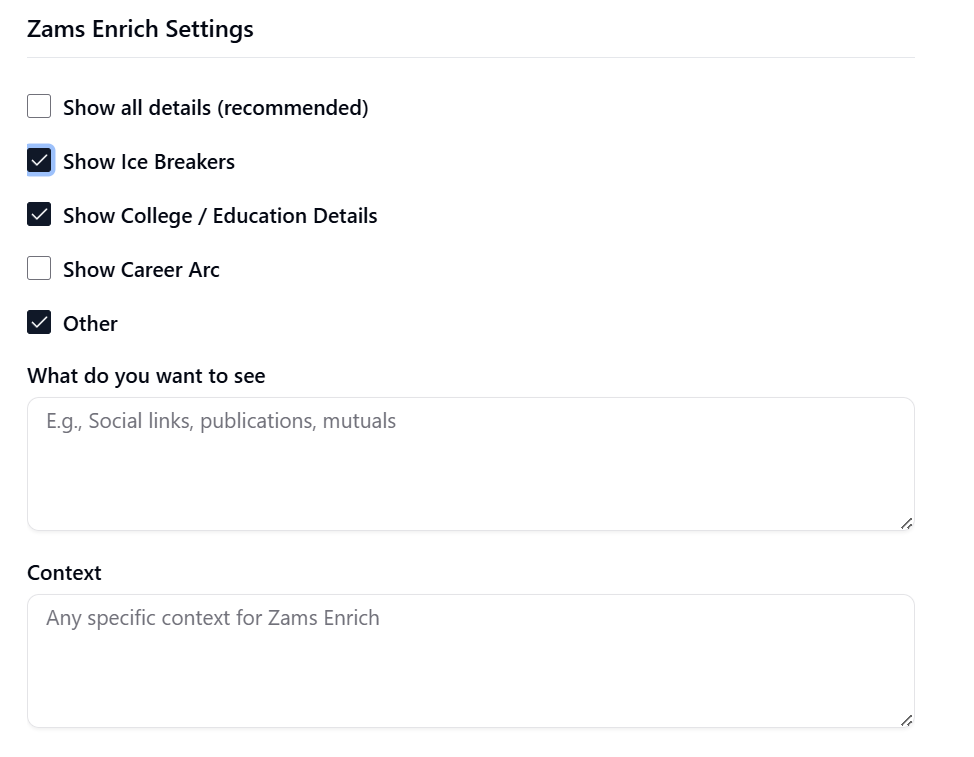
Select what details to return:
Show all details – returns everything (recommended).
Show Ice Breakers – quick conversation starters.
Show College / Education Details – education background.
Show Career Arc – work history overview.
Other – define custom fields.
Use the text boxes to refine results:
What do you want to see – list custom items (e.g., social links, publications).
Context – add focus or direction (e.g., “highlight recent achievements in tech”).
Available Functionalites
Funcionality | Description |
Enrich Person | Retrieve detailed public information about an individual. Use either their name and company or a LinkedIn profile URL. |
Enrich Company | Retrieve public information about a company, including background details and team context. |
Custom Enrichment | Customize exactly what you want ZamsEnrich to gather by specifying fields (e.g., “recent projects,” “industry awards”). |
Example of Use
You can interact with ZamsEnrich using plain language. For example:
Profile enrichment:
“
@Zams Enrichhttps://www.linkedin.com/in/nirmandave/”
Title enrichment:
“
@Zams Enrich ProFind me the email for the CTO at OpenAI. ”
Data enrichment with Google Sheets:
“Use the Outbound Lead spreadsheet from
@Google Sheetsfor each Linkeding URL in the sheet, user@Zams Enrichto find the person's name, location and email. Then create a column for each and fill it in there.”
Billing and Usage
ZamsEnrich works on a credit-based system:
Each Zams account starts with 50 credits per month.
Credits are consumed every time you run an enrichment request.
Standard vs. Pro
Plan | Credit Cost | Level of Detail |
Zams Enrich | 1 credit per use | Provides enrichments stored in our enrichment database. |
Zams Enrich Pro | 2 credits per use | Provides live enrichments, retrieved on demand on public sources. |
To check your usage:
Go to Settings > Usage in your dashboard.
Scroll to the Usage section to see your available credits and past consumption.
Note
If you need more credits, you can contact the Zams Sales Team to upgrade your plan.